Data Hygiene
Catch data issues before they shape the forecast.
Stale close dates. Missing deal values. Disconnected customer records. Find the gaps, see who owns them, and give your forecasts, attribution, and AI analysis better inputs.
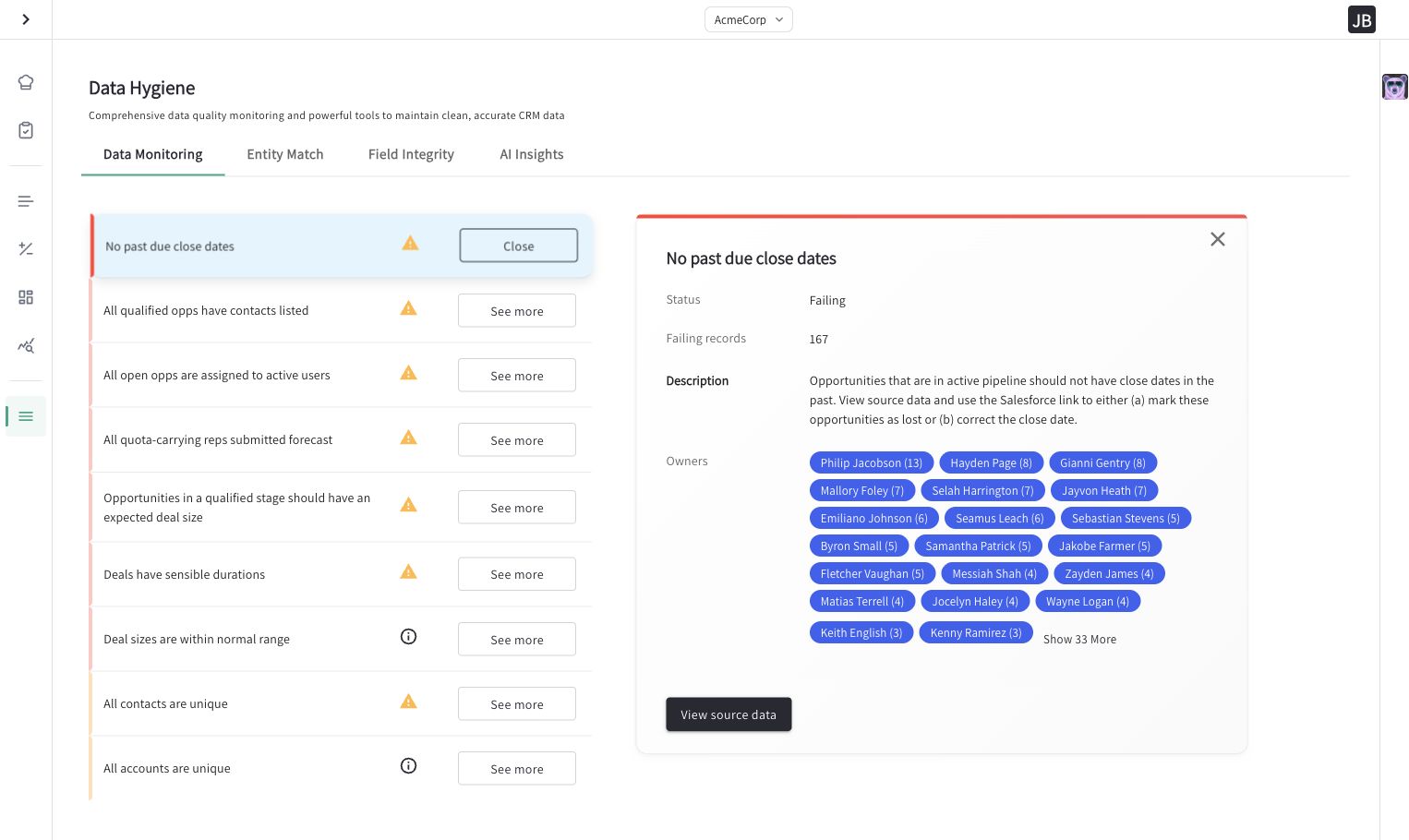
Turn recurring data checks into a focused worklist. See the issue, the affected records, and the owners who can act before bad inputs reach the forecast.
Trusted by








Small data gaps. Expensive decisions.
Data quality becomes a business problem when it changes the answer. Focus the cleanup on the inputs your team uses to plan, invest, and act.
Forecasts built on stale deals
Past-due close dates, missing values, and inactive owners leave the pipeline looking healthier than it is. Find the records that need attention before the forecast review.
Attribution with missing connections
Missing opportunity contacts and duplicate records break the link between marketing activity and revenue. Surface the gaps that make the buyer journey harder to explain.
AI working from incomplete context
A polished answer can still rest on a bad input. Make data quality part of the workflow before asking AI to explain performance or recommend the next move.
Turn a warning into a clear next step.
Go straight from a finding to the deals behind it. Review the owner, account, stage, close date, and value, then open the source record to make the correction.
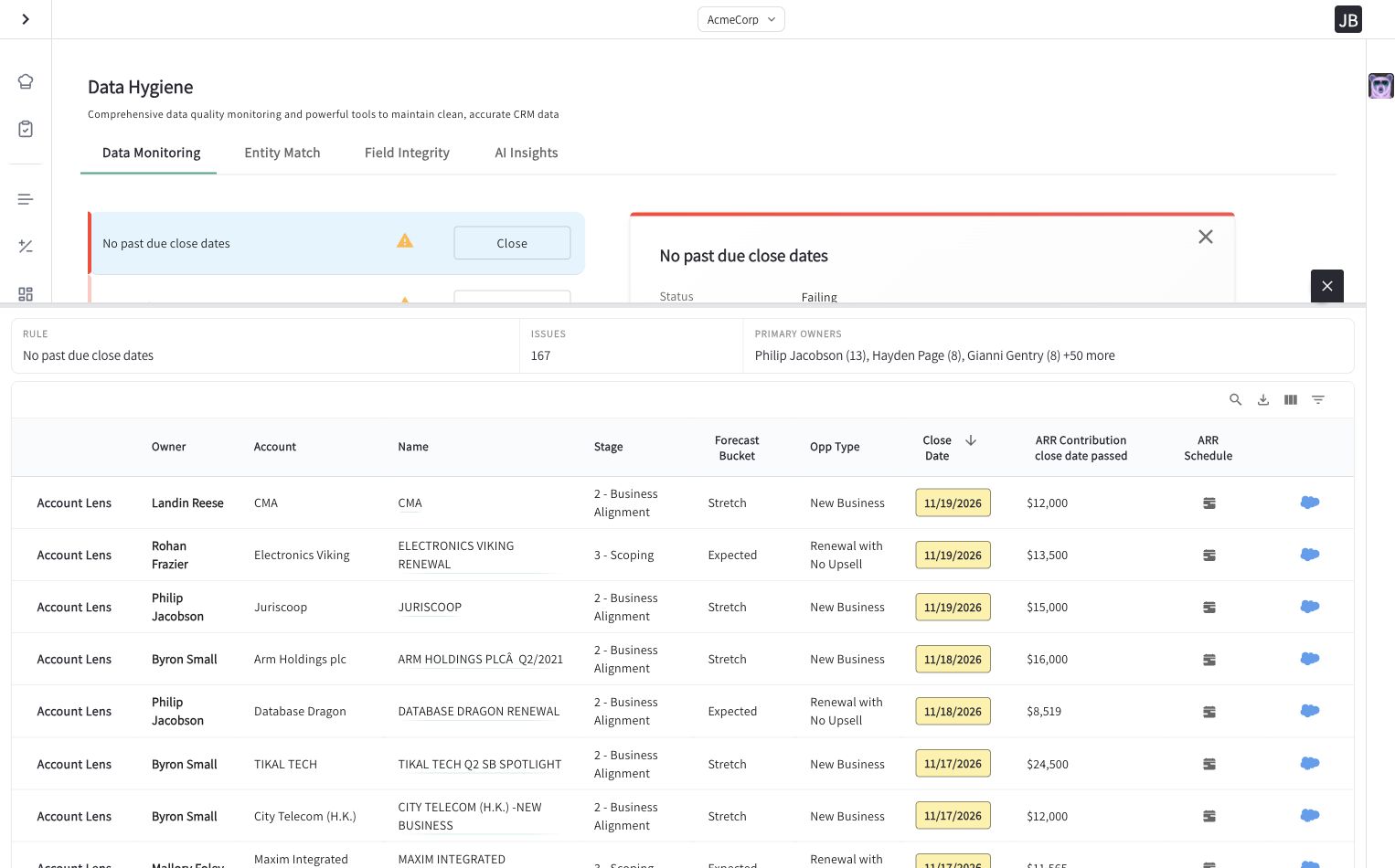
Review past-due opportunities with their owners, values, and close dates together, so the team can resolve the records that distort pipeline reporting.
Keep it clean. Tackle the backlog.
Use ongoing monitoring for the issues that keep coming back, and targeted tools for the cleanup that needs a closer look.
Build hygiene into the operating rhythm
Give RevOps and deal owners a shared place to find the issues behind unreliable pipeline data.
- Spot stale dates, missing values, and ownership gaps.
- See affected-record counts and the owners involved.
- Review the source records before the next business review.
Give cleanup work a defined scope
Work through missing fields and fragmented customer identities when a migration, reconciliation, or analysis exposes a deeper problem.
- Use Field Integrity to inspect completeness across selected fields.
- Use Entity Match to reconcile customer identities across datasets.
- Review matching proposals before accepting them.
Give AI a stronger starting point.
Your AI tools need more than access to the CRM. They need inputs your business can trust. Pair data quality checks with QFlow's shared context and repeatable analytics.
- Find the weak input
- Catch missing amounts and stale dates before they become assumptions in a forecast or scenario.
- Connect the business context
- Bring the relevant accounts, opportunities, and owners into the review so your team can explain what needs to change.
- Keep the answer inspectable
- Trace the analysis back to the underlying records. Make the next decision with evidence your team can examine.
Before you start cleaning up
What kinds of issues can QFlow surface?
Data Monitoring checks for issues such as past-due opportunity close dates, missing deal values, missing opportunity contacts, inactive owners, missing forecast submissions, unusual deal durations, and duplicate records. Available checks depend on your connected data and configuration.
Can we see the records behind a finding?
Yes. Open a finding to see its explanation, affected-record count, and owners. Drill into the underlying records to review the accounts, deals, dates, and values, then follow the source-system link to take action.
How is ongoing monitoring different from a cleanup project?
Monitoring helps you catch recurring issues as the business changes. Targeted cleanup addresses a defined problem, such as missing fields or fragmented customer identities across datasets. QFlow brings Data Monitoring, Field Integrity, and Entity Match into the same workspace so your team can use the right approach for the problem.
Does finding an issue automatically change our CRM?
No. A monitoring finding identifies the problem and gives your team the records and context to act. Source corrections and entity-matching reviews are separate steps, so a flagged issue is not a blanket approval to change or merge records.
How does this help us get more reliable AI analysis?
Reliable analysis starts with the dates, amounts, relationships, and definitions behind it. Data Hygiene helps your team find input problems before using that data in forecasts, attribution, or AI-assisted analysis. It works alongside QFlow's business context and repeatable analytics to make the answer easier to inspect and trust.
Give your next decision better inputs.
See how QFlow turns data-quality findings into focused work for the people who can fix them.