QFlow Recipes
Your best analysis,
ready to run again.
The question comes back every week. The work should carry forward. Define the sources, calculations, and review steps once, then run the recipe on fresh data for the next deal review, pipeline update, or reporting cycle.
Turn a recurring question into an inspectable workflow. Recipes preserve the analytical steps and their outputs so your team can repeat the method on fresh data.
Keep the method with the answer.
A useful analysis contains choices: which records count, which period matters, and how the result is calculated. Make those choices reusable.
01
Define the inputs
Choose the sources, business period, filters, and measures. Make the scope of the question explicit before calculating the answer.
02
Save the method
Connect data retrieval, calculations, and analytical tools in an ordered workflow. Inspect each step and its output as you build.
03
Review and repeat
Check the result and its exceptions. Rerun the saved analysis against fresh inputs without rebuilding the workflow for every review.
Build with AI.
Review every step.
Describe the analysis you need and use AI to help assemble or improve the recipe. Then inspect the inputs, transformations, and outputs. Save the calculation you intend to repeat, and keep generated interpretation open to review.
An answer you can question.
Bring the finding, the context, and the missing evidence into the same review.
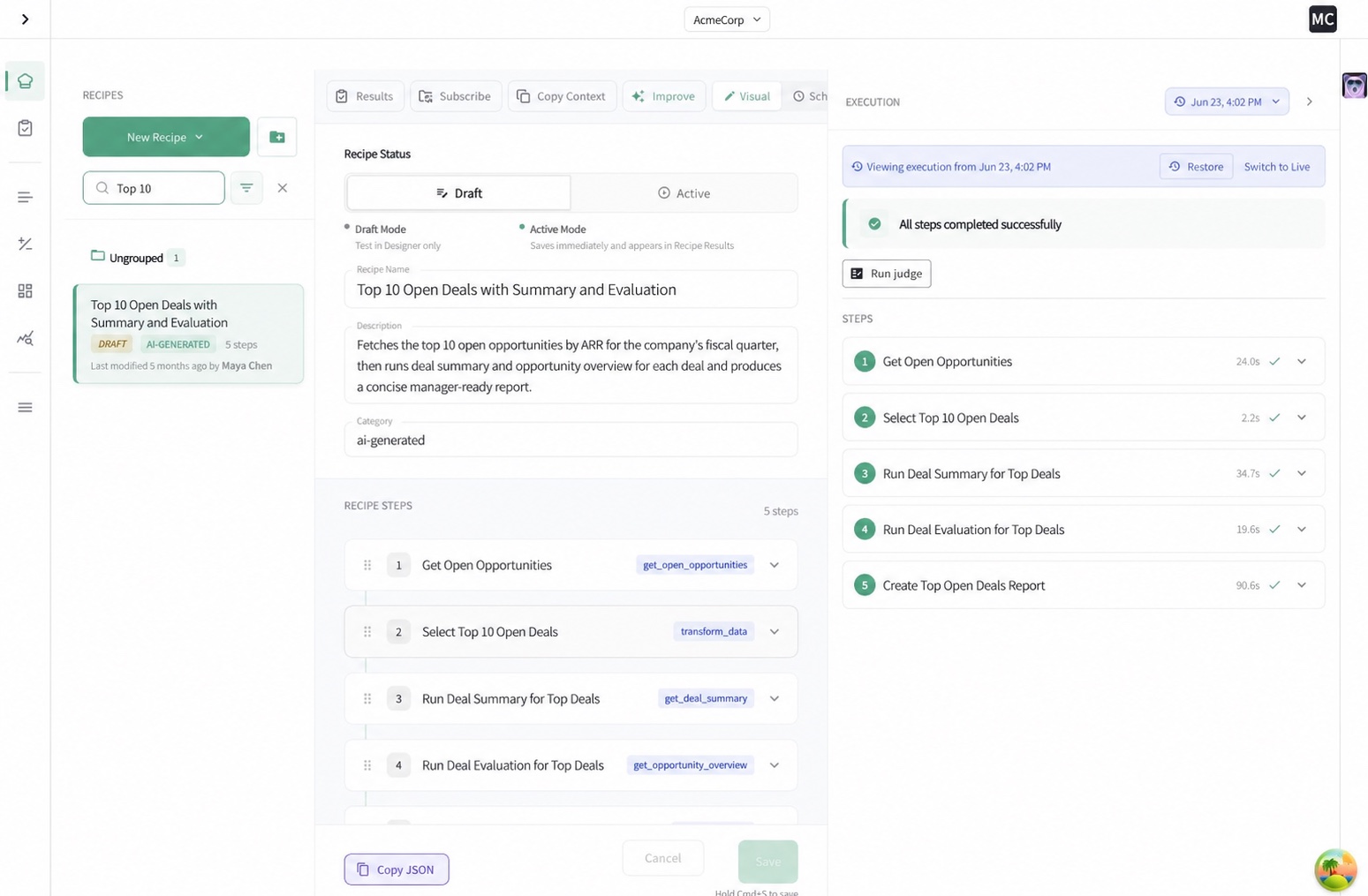
In this saved deal-review run, the recipe selects open opportunities, gathers summaries and evaluations, and produces a manager report. The output distinguishes CRM signals from evidence that still needs to be collected.
- See the period and records behind the result.
- Read the findings alongside their limitations.
- Return to the execution to inspect the contributing steps.
Use the result to decide what to investigate next.
Put deal context, momentum, and missing evidence into one review. Trace the findings back through the recipe before deciding what to do next.
Start with work your team already repeats.
A recurring question deserves an agreed method. Build the workflow around the decision and the people who will use it.
Sales
Prepare the deal review
Select the relevant opportunities, bring together deal summaries and evaluation, and highlight the evidence gaps managers should investigate.
Marketing
Explain pipeline contribution
Compare sources and conversion events using the same definitions each period. Add win/loss context from available conversations and deal history.
Finance and operations
Prepare the reporting cycle
Calculate the agreed business metrics, compare periods, and carry exceptions into the output. Give the next reporting cycle a consistent starting point.
Put the next run on the calendar.
Get the analysis to the team before the conversation starts.
Run a recipe when you need it or schedule the recurring review. Deliver the result through Slack, Microsoft Teams, email, or a webhook. A Business Digest can be one step in the workflow, so the briefing follows the same underlying analysis each time.
Explore Business DigestFrom a recipe result to finished work
Use the recipe through QFlow Desktop and MCP from Claude or Codex. Add an organization skill with your team's instructions and templates to prepare the board deck, workbook, or written review.
The recipe owns the analytical method. The skill carries the conventions for the final deliverable. Your team reviews the result before it goes out.
Explore Desktop and skillsBefore you build your first recipe
How is a recipe different from a saved prompt?
A prompt describes what you want. A recipe saves the analytical workflow: which data to retrieve, which filters and calculations to apply, and how to assemble the result. You can inspect the steps and their outputs, then rerun the saved method as the underlying business data changes.
Where does AI fit, and what happens to the calculations?
AI can help create or refine a recipe and interpret its results. Data retrieval, aggregation, and saved transformations execute as defined steps. Generated summaries and recommendations remain interpretation to review. Keeping those roles separate lets you revisit the calculation without treating the narrative as proof.
Can recipes use unstructured information?
Yes. A recipe can combine analytical tools with deal summaries and evaluations based on available emails, notes, and supported call-recording integrations. The useful distinction is between what the records establish and what the analysis infers. Missing conversation evidence should remain visible in the result.
Can we schedule a recipe and share the result?
Yes. Recipes can run on a schedule and deliver results through Slack, Microsoft Teams, email, or a webhook. Configure the workflow and destination for the team receiving it. A Business Digest can be one of the analytical tools in that recurring workflow.
Can we use recipes from our existing AI tools?
QFlow Desktop and MCP make QFlow recipes and analytical tools available to supported AI clients, including Claude and Codex. Use the saved recipe when a question needs a consistent method, and let the AI client help investigate or present the result.
How do recipes and organization skills work together?
Recipes produce repeatable analytical results. Organization skills hold the instructions, templates, and reference material for turning those results into finished work, such as a board deck or reporting workbook. Keep the calculation in the recipe and the presentation conventions in the skill, with human review before sharing.
Bring the analysis you keep rebuilding.
Start with one recurring review. Define the inputs, inspect the output, and make the next run easier to repeat.