Prep the Data
Trusted data takes more than a cleanup.
Keep definitions current. Catch recurring issues. Tackle the reconciliation projects that keep getting deferred. QFlow brings that work together so your team can spend more time using the data.
See the issues before they become the explanation.
A clean dataset is a moment in time. New deals, changing owners, and shifting processes create new exceptions. QFlow helps you inspect the recurring issues and the records behind them.
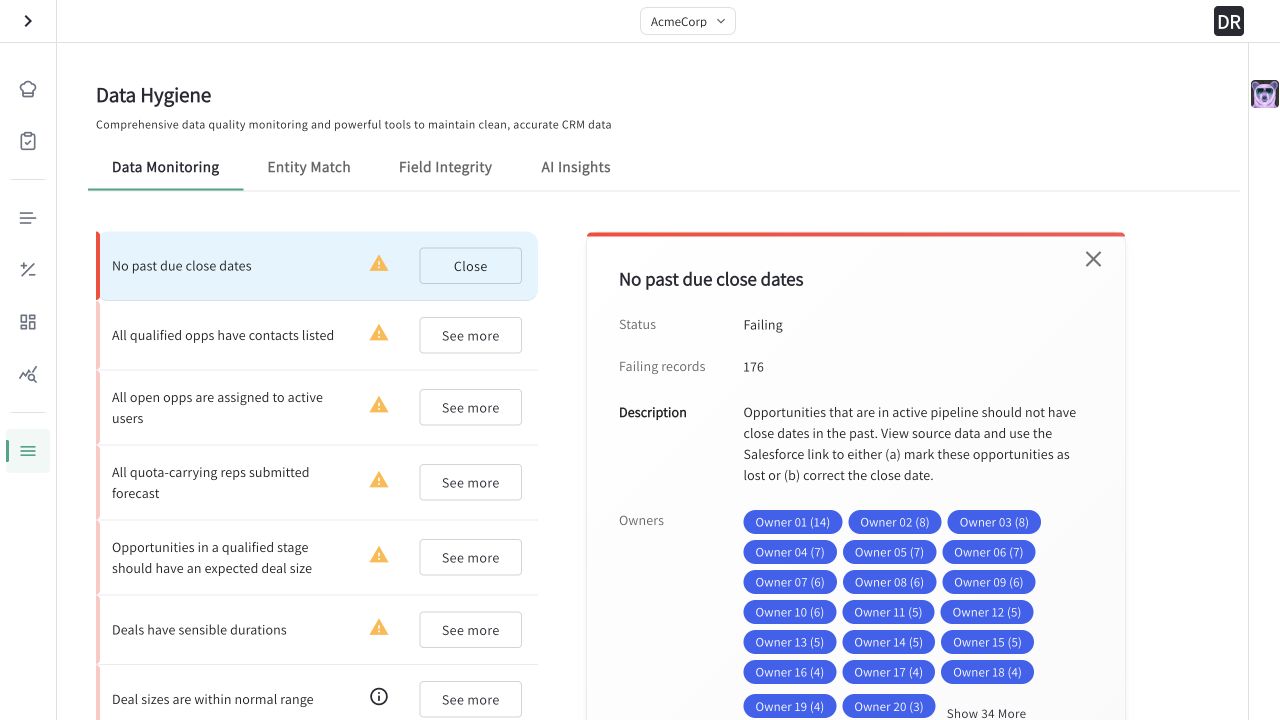
Keep data hygiene active between cleanup projects. Recurring checks identify affected records and responsible owners so the team can investigate and resolve the issues.
Different problems need different kinds of hygiene.
A missing field, a stale forecast, and a customer mismatch each call for a different response. Start with the category, then follow the issue to the business decision it affects.
- 01Meaning & consistency
- Does Amount mean ARR or total contract value? Which date determines the reporting period?
- The same metric should have the same basis in a dashboard, a plan, and an AI answer.
- 02Completeness & validity
- Missing deal values, absent contacts, invalid dates, or inconsistent field values.
- Find the inputs that make a record unusable or a comparison misleading.
- 03Freshness & process
- Past-due close dates, stale opportunities, or forecasts that were never submitted.
- Separate a current business signal from an update that has not happened.
- 04Ownership & relationships
- Inactive owners, duplicate accounts, or transactions without a customer relationship.
- Know who can resolve an issue and which records belong in the analysis.
- 05Cross-system reconciliation
- A CRM customer does not match billing, or bookings and revenue tell different stories.
- Explain the difference at the customer and transaction level, including timing and definitions.
The minimum is a dictionary you maintain.
A list of column names is only the start. Capture what the business means, then keep that context useful as systems and processes change.
- Fields, source systems, and the relationships between records.
- Metric definitions, units, currencies, date rules, and exclusions.
- The business owner who can settle a question or approve a change.
QFlow keeps business definitions close to the analysis. Review the proposed context with your team, then reuse it in reports, Recipes, and AI workflows.
Explore connected business contextDefine what each field means before it drives the analysis. Dictionary diagnostics make the booking definition and unresolved questions reviewable before approval.
The expensive part is keeping all the pieces working.
Traditional tools can do this. Your team still has to connect the work across the catalog, warehouse, BI layer, scripts, and spreadsheets, then maintain it every time the business changes.
The ongoing job
Work your team has to assemble
What QFlow brings together
Keep the dictionary current
Work your team has to assemble
Document fields and formulas, reconcile competing definitions, and update them when the source or process changes.
What QFlow brings together
Keep business definitions and field context alongside the data and analytical tools that use them.
Turn a rule into a routine
Work your team has to assemble
Write checks, schedule queries, build alerts, and maintain a way to inspect and follow up on failures.
What QFlow brings together
Use ongoing hygiene checks with affected-record and owner views to move from a finding to an investigation.
Connect the systems
Work your team has to assemble
Maintain identifiers, joins, matching rules, and a spreadsheet of exceptions that never quite disappears.
What QFlow brings together
Review proposed customer relationships and preserve source references for unresolved matches.
Carry the work into analysis
Work your team has to assemble
Rebuild the same filters, date rules, and corrections in each workbook, dashboard, or AI session.
What QFlow brings together
Reuse governed context and recipe steps across reporting, planning, and supported AI tools.
Unblock the project that keeps slipping a quarter.
The customer list that never matched billing. The acquisition still living in a separate CRM. The ARR bridge held together by manual adjustments. These problems need a focused reconciliation, backed by a foundation you can keep using.
01
Establish the customer
Review which CRM, billing, and finance records represent the same business. Keep uncertain matches visible instead of quietly forcing a join.
02
Explain the difference
Compare the relevant contracts and transactions. Separate missing records from timing, currency, revenue basis, and other business-rule differences.
03
Keep the resolution useful
Carry accepted relationships and definitions into subsequent analysis. Use recurring checks to surface the kinds of exceptions the project uncovered.
A reconciliation should explain the difference.
Bookings, invoices, and recognized revenue can legitimately have different values and dates. The goal is to understand the bridge and resolve the exceptions, not force every total to agree.
“It feels so good to have the process and tools in place for a single source of corporate truth for our data.”
Before the next cleanup becomes another project
Where should we start if the data is mostly in good shape?
Start with the minimum foundation: a maintained data dictionary, agreed metric definitions, and recurring checks on the fields and relationships that matter. Choose a report or decision your team already relies on, then work backward to its inputs. A large cleanup project is not a prerequisite for making those inputs more dependable.
How is this different from our warehouse and BI tools?
Those tools can support data quality, but your team still has to build and maintain the definitions, tests, joins, exception views, and follow-up process. QFlow brings business context, hygiene monitoring, reviewed relationships, and analytical workflows together. The value is in reducing the separate pieces your team has to coordinate, while keeping decisions about business meaning with your team.
Can we tackle an old reconciliation problem without fixing everything first?
Start with a bounded problem: one customer population, revenue stream, or reporting period. Establish the definitions, review the relevant relationships, and inspect the exceptions. Expand from that foundation as you resolve the issues. Scope and effort depend on the source records and how much history is available.
Should bookings, billing, and revenue always match?
No. They can measure different events on different dates and different value bases. A useful reconciliation explains those differences and identifies missing or inconsistent records. It should not force legitimately different measures into the same total.
Does QFlow automatically overwrite our source data?
Reviewing a finding or adopting a relationship in QFlow is separate from changing a record in your CRM or accounting system. Your team reviews the evidence and decides on the appropriate correction. A matching proposal is not an instruction to merge or overwrite source records.
Why does this matter for Claude, Codex, and other AI tools?
An AI tool needs to know what an amount means, which customer a record belongs to, and whether the inputs can support the question. QFlow Desktop and MCP provide supported tools with governed business context; Recipes make analytical steps reusable. A shared dictionary and visible data issues give the analysis a more consistent starting point.
Start with the data problem your team keeps working around.
A disputed definition, a recurring issue, or an unfinished reconciliation. Bring the problem and see how QFlow helps you work through it.
Download the use-case overview